We are going to fix iPhone 6 with WiFi failure in this article, the mobile phone is, according to customer's description, when enter the setup page, the phone will get stuck. In addition, when check the WiFi function on shortcut, WiFi is not able to turn on. How to solve the problem?
 The mobile phone is disconnected, now measure the status with DC power supply. It is found that the current jump is normal, and there is no case of large current. After the removal of motherboard, After the inspection under trinocular stereo microscope, we find that the iPhone WiFi chip was replaced before.
Remove the chip first, because the last repairman had changed the WiFi chip, and there was no large current when turning on, so it was initially not the problem of the chip.The 13 pin of the solder pad is measured infinite (normal resistance more than 400).
 The signal passes through the resistance R0711 to the CPU, and the resistance R0711 is found to have a resistance, and it seems not to be broken at the bottom of the CPU, weld jumper wire from the resistance R0711 to the WiFi's 13 pin.
Then install the chip to test, it is not good to use either, dismantle the chip to continue to hit the welding disc block value found that the 36 feet of the pad will be able to hit the point with point force, light point is not.
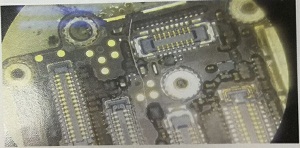 There seems to be a problem here. There is a test point in the middle of the 32K clock to CPU. We choose to weld jumper wire directly from the test point.
Reinstall the chip and install to test . It will not stuck on setup page. The WiFi signal is normal.
More cell phone repair information, you can visit on www.vipfixphone.com

Remove the chip first, because the last repairman had changed the WiFi chip, and there was no large current when turning on, so it was initially not the problem of the chip.The 13 pin of the solder pad is measured infinite (normal resistance more than 400).

Then install the chip to test, it is not good to use either, dismantle the chip to continue to hit the welding disc block value found that the 36 feet of the pad will be able to hit the point with point force, light point is not.
Reinstall the chip and install to test . It will not stuck on setup page. The WiFi signal is normal.
More cell phone repair information, you can visit on www.vipfixphone.com
评论
发表评论